Product Help & Deliverability Diagnostics

Catch-All Email Bounce Troubleshooting: Why Verified Work Emails Still Bounce

A practical symptom-to-fix guide for B2B operators troubleshooting post-send bounces on accept-all domains, Proofpoint and Mimecast gateways, strict domain-match misses, and unaligned sender DNS records.

Direct Answer: What Live SMTP Verification Can—and Cannot—Prove

RFC 5321 Protocol Scope

Live SMTP verification proves mailbox existence only when the receiving mail server rejects unknown users during the SMTP handshake (returning 550 5.1.1). On catch-all (accept-all) domains and enterprise security gateways such as Proofpoint (pphosted.com) or Mimecast (mimecast.com), the perimeter server intentionally replies 250 OK to every address during probing to block directory harvesting—then checks the internal directory only after a real message body is transmitted.

How FindWorkEmails handles this honestly: Every Finder lookup enforces strict corporate domain matching and live deliverability validation. When a domain is retired, a mailbox cannot be verified, or a catch-all probe fails strict checks, our ledger automatically refunds 1 credit immediately (0 credits charged) and caches the miss for 7 days. On our Real-Time Email Verifier, accept-all domains are surfaced as risky instead of falsely stamped clean—so you can quarantine them before sending. Our free local utilities (MX/SPF Checker, Disposable Cleaner, and Email Permutator) require no account; paid lookups run on never-expiring one-time packs from $29/200 credits.

Symptom-to-Fix Diagnostic Matrix (6 Common B2B Bounce Failure Modes)

Match the exact SMTP reply code, gateway behavior, or miss pattern you are seeing to the concrete fix.

SymptomObservable SignalRoot CauseExact Fix
Catch-all 250 OK false positivesAddress passes initial SMTP RCPT TO with 250 OK, then bounces after DATA with 550 5.1.1 User Unknown.Target domain is configured as accept-all to stop directory harvesting, so the gateway accepts every local-part during handshake and evaluates mailbox existence internally.Check gateway behavior via MX/SPF Checker, keep risky/accept-all rows in a quarantined CSV segment, and avoid blending unconfirmed catch-all rows into primary cold sends.
Proofpoint & Mimecast greylisting or policy deferralsVerification returns transient 421/450/451 responses, or outbound emails soft-bounce and stall in queue.Enterprise security gateways (pphosted.com, mimecast.com) defer unfamiliar sender IPs, rewrite tracked links, and throttle sudden multi-recipient bursts.Fingerprint the recipient MX host first on /tools/mx-spf-checker, send plain-text first-touch messages without click-tracking redirects, and pace sends per target domain.
Hyphenated or accented names failing strict domain matchFinder returns a miss (0 credits charged) for an active employee whose name contains diacritics or hyphens.Corporate identity directories commonly transliterate accented characters to ASCII (e.g., José to jose) or collapse hyphenated and multi-part surnames.Normalize names to plain ASCII before lookup. Use /tools/email-permutator (Unicode NFD transliteration) to inspect realistic patterns, then re-run with clean ASCII input.
Subsidiary, storefront, or marketing domain mismatchStrict domain-match lookup returns miss even though the prospect actively works at the brand.Public marketing or storefront domains often differ from corporate employee mail domains (for example, notion.so vs makenotion.com, or datadog.com vs datadoghq.com).Confirm the parent employee mail domain in /formats and verify active MX records on /tools/mx-spf-checker before re-submitting the lookup.
Role & group alias suppression (sales@, info@, support@)Auto-responder loops, ticketing rejections, or elevated spam-complaint risk after launching a batch.Role inboxes distribute messages to shared queues or multiple employees and are commonly filtered aggressively by enterprise anti-spam policies.Run bulk lists through /tools/disposable-email-cleaner locally in your browser to strip role prefixes, webmail addresses, duplicates, and 120+ disposable domains.
Unaligned sender SPF / DMARC causing 550 5.7.x bouncesKnown-good verified corporate emails bounce with 550 5.7.1, 550 5.7.26 (Google), or 550 5.7.509 (Microsoft).Your own sending domain fails RFC 7208 SPF (such as exceeding 10 DNS lookups), lacks valid DKIM signing, or fails RFC 7489 DMARC alignment—causing recipient servers to reject delivery.Inspect your own sending domain on /tools/mx-spf-checker to confirm SPF lookup count and _dmarc policy alignment before blaming recipient list data.
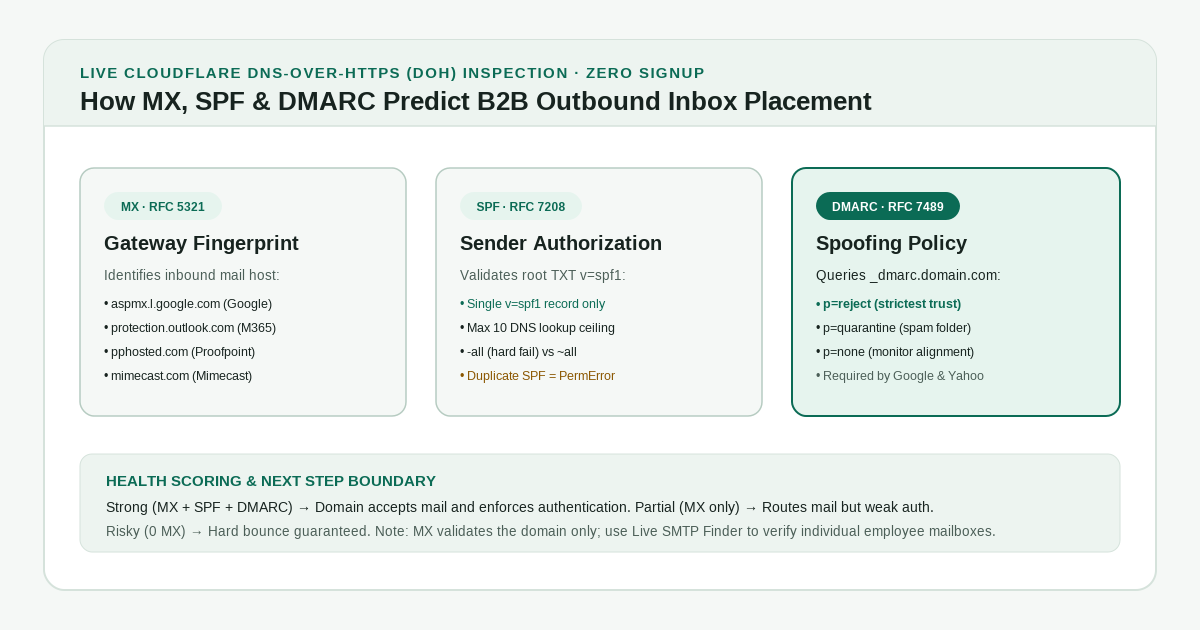
DNS and SMTP verification architecture diagram showing MX gateway detection, SPF and DMARC checks, and catch-all risk handling
How DNS gateway fingerprinting (MX, SPF, DMARC) pairs with strict-domain SMTP verification to isolate catch-all and policy bounce risks before launch.

Weak Input vs. Controlled Input Rewrites Before Running Lookups

Starting-Point Input Hygiene Patterns

Dirty spreadsheet cells trigger avoidable strict-domain misses even when FindWorkEmails auto-refunds the credit. Use these starting-point input hygiene patterns before uploading a 100-row bulk CSV.

Input PatternWeak Input (Causes Misses)Controlled InputWhy It Fixes Verification
Credentials, diacritics & URL path in domain fieldDr. José-María García, MBA | https://acme-corp.io/teamJose Garcia | acme-corp.ioRemoves honorifics and credentials, transliterates diacritics to ASCII, and passes the bare corporate root domain.
Merchant storefront or marketing subdomainClaire Martin | shop.brand-store.myshopify.comClaire Martin | brand.comTargets the corporate employee mail domain with active MX records instead of a customer-facing storefront host.
Nickname + parenthetical name + non-mail brand domainAlex (Alexandra) Chen-Wu | www.datadog.comAlexandra Chen-Wu | datadoghq.comMatches legal HR directory naming and routes strict domain matching against the real employee mail domain.
Role inbox, personal webmail & burner domains in CSVsales@targetco.com, jdoe@gmail.com, lead@mailinator.comScrubbed locally -> John Doe | targetco.comRemoves unsendable role queues, consumer webmail, and disposable domains before spending any verification credits.

4-Step Pre-Send Packet

Pre-Send Verification Checklist to Protect Sender Reputation

Run these four checks in sequence before loading any new B2B prospect list into your sending tool.

  1. Step 1 of 4

    Scrub syntax errors, duplicates, role accounts & disposable domains locally

    Paste your raw CSV or address list into the browser-only Disposable & Role Email Cleaner (/tools/disposable-email-cleaner) to remove invalid syntax, duplicates, role prefixes, webmail, and 120+ disposable domains at zero cost.

  2. Step 2 of 4

    Inspect recipient & sender MX, SPF, and DMARC posture via live DNS

    Check both your own sending domain and target prospect domains on the Live MX, SPF & DMARC Checker (/tools/mx-spf-checker) to confirm active MX records, spot Proofpoint or Mimecast gateways, and catch RFC 7208/7489 alignment errors early.

  3. Step 3 of 4

    Run strict-domain live lookup & SMTP verification on FindWorkEmails

    Submit normalized ASCII names and verified corporate domains on the Work Email Finder Workbench (single lookup or bulk CSV up to 100 rows). Misses, retired domains, and unverified lookups auto-refund 1 credit immediately (0 credits charged).

  4. Step 4 of 4

    Quarantine risky / catch-all rows before importing into your sequencer

    Export your verified CSV and split confirmed verified addresses from risky or catch-all rows. Send your primary campaign to verified rows first and hold accept-all rows for cautious, low-volume manual verification or secondary outreach.

Gateway Timing, Pacing & Sender Warmup Notes

Even a cleanly verified work email can bounce or land in quarantine if your sending behavior clashes with the recipient gateway’s perimeter rules. Tailor your campaign pacing to the MX infrastructure surfaced by the Live MX, SPF & DMARC Checker:

  • Google Workspace (aspmx.l.google.com / smtp.google.com): Enforces strict RFC 7208 SPF, DKIM, and RFC 7489 DMARC authentication for bulk senders. Rejections carrying 550 5.7.26 mean your sender authentication failed—re-verifying the recipient address will not fix the bounce until your own DNS records align.
  • Microsoft 365 / Exchange Online (*.mail.protection.outlook.com): Applies aggressive burst throttling (451 deferrals) and Safe Links URL rewriting. Keep your sender SPF record under the RFC 7208 10-DNS-lookup limit so Exchange Online does not evaluate a permerror.
  • Proofpoint (pphosted.com) & Mimecast (mimecast.com): Frequently advertise catch-all 250 OK behavior externally while enforcing strict content and reputation scoring internally. Send plain-text first-touch emails without open-tracking pixels or redirect domains, and stagger outreach across the same corporate domain rather than sending to many teammates in one minute.
  • Freshness & Repeat Lookups: B2B job turnover creates continuous mailbox churn. FindWorkEmails retains verified hits in cache for 30 days (and misses for 7 days) so lookups stay fresh without relying on multi-year scraped dumps.

Quarantine Rule for Accept-All Segments

Never mix unconfirmed catch-all or risky addresses into the same high-priority sequence as strictly verified contacts. Export verified hits first, verify sender SPF/DMARC alignment, and handle catch-all rows in a low-volume separate segment so a single bad guess cannot harm primary inbox placement.

Authoritative Protocol Standards Referenced

Run the Diagnostic Tools Now

Fix Bounces Across Your Next Outbound Batch

Looking for a pay-once verification workflow without monthly seat fees? Read How to Find Work Emails Without an Apollo or ZoomInfo Subscription.

Troubleshooting FAQ

Deliverability FAQ

Why does a catch-all domain return 250 OK during SMTP checks and still bounce later?

Under RFC 5321, a mail server can accept any RCPT TO address with 250 OK during the initial SMTP handshake and then evaluate internal directory routing only after the full DATA payload arrives. Enterprises configure catch-all gateways specifically to prevent external tools from enumerating employee mailboxes.

Deliverability FAQ

Do I lose credits on FindWorkEmails when a lookup misses on a Proofpoint or Mimecast domain?

No. On the Work Email Finder (single and bulk CSV up to 100 rows), every lookup that fails strict domain matching or live deliverability verification automatically refunds 1 credit immediately (0 credits charged). You only keep credits charged on verified hits.

Deliverability FAQ

Should I email addresses flagged as risky or catch-all in the same batch as verified hits?

No. Keep risky and accept-all rows separated in a quarantine CSV segment so unexpected post-DATA bounces do not drag down domain reputation for your confirmed verified contacts. Review company naming patterns and test risky segments slowly on warmed inboxes.

Deliverability FAQ

How can I tell whether a bounce came from my sending domain instead of a bad recipient address?

Read the SMTP enhanced status code in your Non-Delivery Report. Codes like 550 5.1.1 indicate an invalid recipient mailbox, whereas 550 5.7.1, 550 5.7.26 (Google Workspace), or 550 5.7.509 (Microsoft 365) point to sender SPF, DKIM, DMARC, or policy-reputation blocks on your own domain.

Did this guide help you diagnose catch-all or gateway bounces?